Introduction
Amazon keyword harvesting is the process of identifying high-performing search terms from your PPC campaigns and adding them as targeted keywords in manual campaigns. This gives you more control over how you bid on search terms that have already proven they can generate results.
If you’re running Amazon ads but not actively managing the search terms reports or data you are leaving valuable opportunities on the table. Every click and conversion gives you insight into what customers are actually searching for and some of those search terms can become your next high-performing keywords.
This guide will break down the complete Amazon keyword harvesting process, from identifying high-performing search terms and moving them into manual campaigns to using negative keywords and how automation can help close that gap.
What Is Amazon Keyword Harvesting?
Keyword harvesting, also known as search term harvesting, is the process of analyzing your advertising data to identify search terms that are driving results and turning those terms into targeted keywords in your manual campaigns. It gives you great control over how you bid with good strategy instead of relying on automatic targeting.
The key difference between a keyword and a search term is simple. A keyword is what you target in your campaign, while a search term is what the customer actually types into Amazon. For example, you might target wireless earbuds, while a customer searches for wireless earbuds for running. That customer search is the search term your campaign can generate data for.
This is where keyword harvesting comes in. Your automatic campaigns can discover a wide range of customer searches. When a search term consistently generates sales at a good ACoS, you can move it into a manual campaign as an Exact Match keyword and optimize its bid more accurately.
Why Keyword Harvesting Matters for Amazon PPC
Running Amazon PPC generates a lot of data, but that data only becomes valuable when you use it to make better advertising decisions. Keyword harvesting helps you turn actual customer search behavior into a more focused and controllable PPC strategy.
When a search term consistently generates sales, moving it into a manual campaign gives you more control over how much you’re willing to bid for that specific search.
This can lead to several advantages:
- Better ACoS: Focus more of your budget on search terms that generate sales efficiently.
- Improved ROAS: Allocate spend toward terms that deliver stronger returns.
- Higher conversion potential: Proven search terms have already shown that they can attract customers who are willing to buy.
- Greater campaign control: Manual targeting allows you to manage individual keyword bids instead of relying entirely on automatic targeting.
- Easier scaling: As you discover more profitable search terms, you can build a stronger library of keywords to target and optimize.
The bigger advantage is that keyword harvesting creates a continuous feedback process. Your discovery campaigns will give you new search terms, your performance data tells you which ones are worth keeping, and your manual campaigns give you more control over those proven terms.
So, this actually helps turn PPC from a campaign you simply spend money on into a system that continuously learns from customer behavior and becomes more refined with each optimization cycle.
How Match Types Affect Keyword Harvesting
Match types control how Amazon matches your keywords with customer searches. This directly affects how many new search terms you can discover for harvesting.
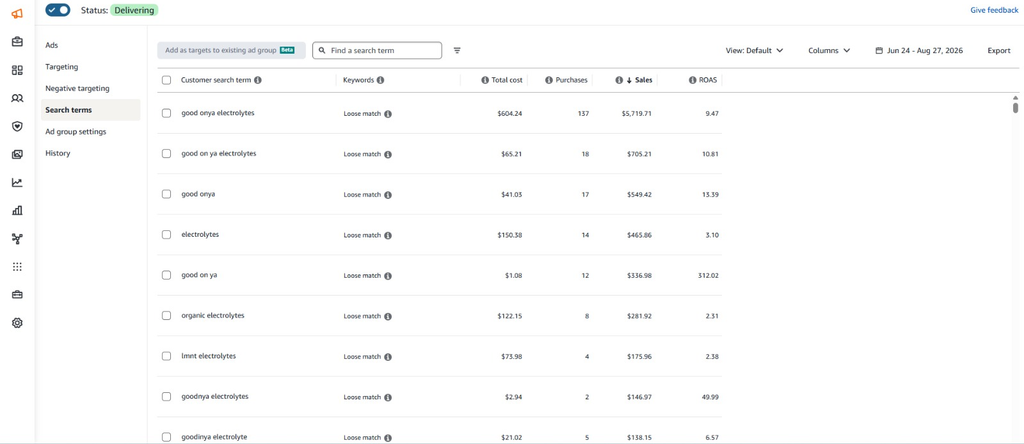
Automatic campaigns are useful for discovery because Amazon finds relevant searches for you. These campaigns can uncover terms you may not have thought of yourself.
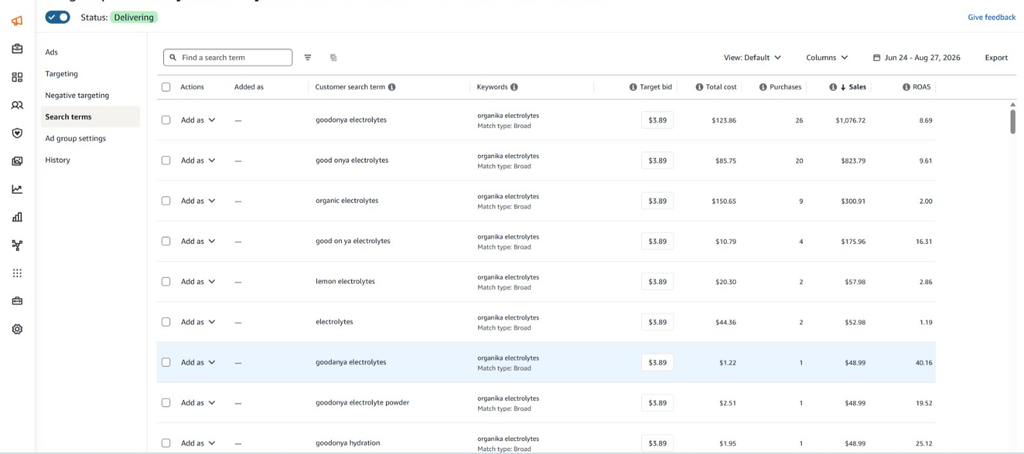
Broad and phrase match can also help with discovery. They allow your ads to appear for a wider range of related searches, giving you more data to review.
Exact match is usually used when you want more control over a proven search term. For example, if “insulated water bottle for gym” generates sales, you can add it as an Exact Match keyword in a manual campaign and manage its bid separately.
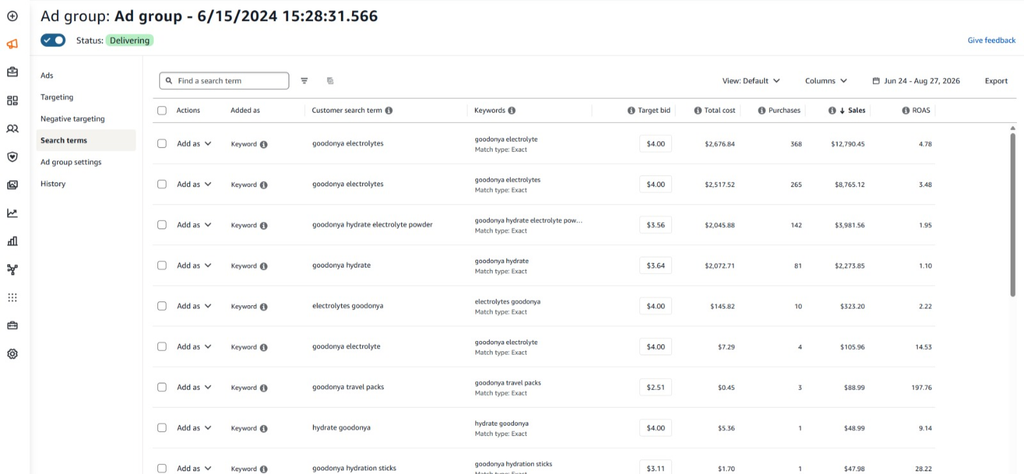
Search Term Report is where you find these opportunities. It shows the actual searches customers used and the results they generated, such as clicks, spend, orders, and sales.
The basic idea is simple:
- Discovery campaigns find the searches.
- The Search Term Report shows what worked.
- Exact Match gives proven terms more control.
This is how customer search behavior turns into new keywords for your campaigns.
Keyword Harvesting Process : Step by Step
Keyword harvesting is not a one-time task. It is a simple cycle of finding search terms, checking their performance, and giving the best ones more control.
Step 1 – Launch Discovery Campaigns
Start with campaigns that can discover new search terms. Automatic, broad, and phrase campaigns can help you find what customers are actually searching for.
Step 2 – Gather Enough Data
Don’t harvest a search term after just a few clicks. Give your campaigns enough time to collect useful data.
The amount of data you need depends on your product, budget, and traffic. The goal is to make decisions based on a clear pattern, not a single sale or click.
Step 3 – Analyze Search Term Reports
Check your Search Term Report regularly to see which customer searches are getting clicks, spending money, and generating sales.
Look at metrics such as clicks, spend, orders, sales, ACoS, and conversion rate.
Step 4 – Identify Winning Search Terms
Now look for search terms that show good performance.
For example, a search term that has generated multiple orders at an acceptable ACoS is a strong candidate for harvesting.
Don’t harvest every search term that gets a sale. Look at the overall performance and your campaign goal before making the decision.
Step 5 – Add Them to Manual Campaigns
Take the search terms you’ve selected and add them as keywords in a manual campaign.
For more control, you can usually add proven search terms as Exact Match keywords and give them their own bids.
Step 6 – Adjust Bids
Once the keyword is in your manual campaign, monitor its performance and adjust the bid based on your goal.
If a keyword is converting well, you may increase the bid to capture more traffic. If it is spending too much without enough sales, you may need to lower the bid.
Step 7 – Add Negative Keywords
Harvesting is not just about finding good search terms. You also need to stop your campaigns from wasting money on terms that don’t perform.
Add irrelevant or consistently poor-performing search terms as negative keywords where appropriate. This helps reduce wasted spend and keeps your campaigns more focused.
Separating Branded and Non-Branded Keywords?
Not every keyword you harvest should be treated the same way. One simple way to organize your keywords is to separate them into branded and non-branded terms.
Branded keywords include your brand name or product name. For example, if your brand is “AquaPro,” searches like AquaPro water bottle or AquaPro insulated bottle are branded searches.
Non-branded keywords don’t include your brand name. Searches such as stainless steel water bottle or insulated water bottle for gym are examples of non-branded terms.
Keeping these two groups separate can make your campaigns easier to manage. It also helps you understand where your sales are coming from.
For example, if most of your conversions are coming from branded searches, your ads may get customers who already know your brand. If non-branded keywords are generating sales, you’re reaching shoppers who may be discovering your product for the first time.
When harvesting keywords, separating branded and non-branded terms gives you a clearer picture of your PPC performance and helps you make better bidding and budget decisions.
The Role of Negative Keywords in Keyword Harvesting
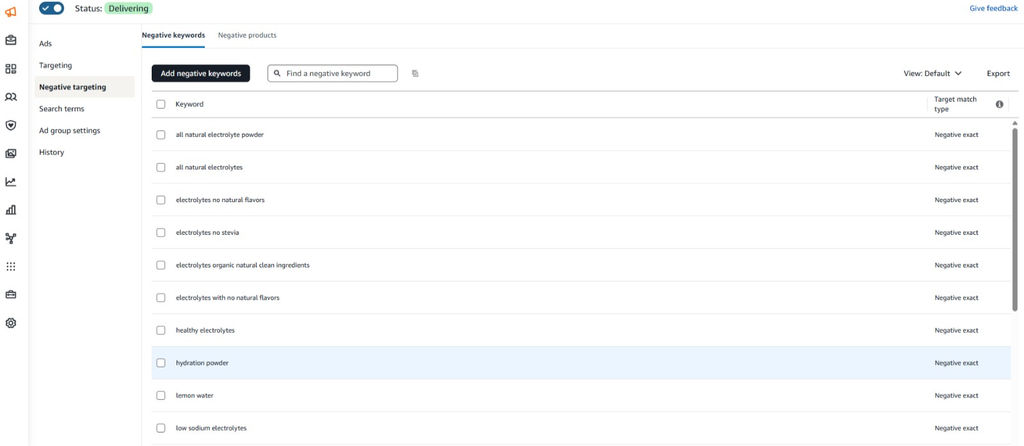
Keyword harvesting is not just about finding search terms that perform well. You also need to control where those search terms appear. This is where negative keywords come in. They tell Amazon when you don’t want your ad to show for a particular search.
Negative Exact
A Negative Exact blocks a specific search term.
For example, if you add a cheap water bottle as a Negative Exact keyword, your ad won’t show when a shopper searches for that specific term.
Negative Phrase
A Negative Phrase blocks searches that contain the phrase you specify.
For example, adding a cheap water bottle as a Negative Phrase can prevent your ad from showing searches such as cheap water bottle for gym or best cheap water bottle.
Preventing Negative
Negatives can also help prevent the same search term from triggering multiple campaigns.
For example, after harvesting a proven search term into an Exact Match campaign, you may add it as a negative in your discovery campaign. This helps move that traffic toward the campaign where you have more control over the keyword and its bid.
Reducing Wasted Spend
Not every search term will be relevant or profitable. Some may get clicks without generating sales, while others may simply have nothing to do with your product.
Adding suitable negative keywords helps stop repeated spending on these searches.
That’s why keyword harvesting and negative keyword management should work together.
You find the search terms that deserve more attention, give them more control, and block the searches that are wasting your budget. This keeps your campaigns cleaner and makes your PPC budget work better.
Why Manual Keyword Harvesting Doesn’t Scale
Manual keyword harvesting works. If you’re managing a small account with a few campaigns, checking your search term data and moving good keywords into manual campaigns is not difficult.
The problem starts when the account grows.
You may have several campaigns running across multiple products, and each campaign can generate hundreds or thousands of search terms. Going through all that data manually can quickly become a regular time-consuming task.
A typical process might look like this:
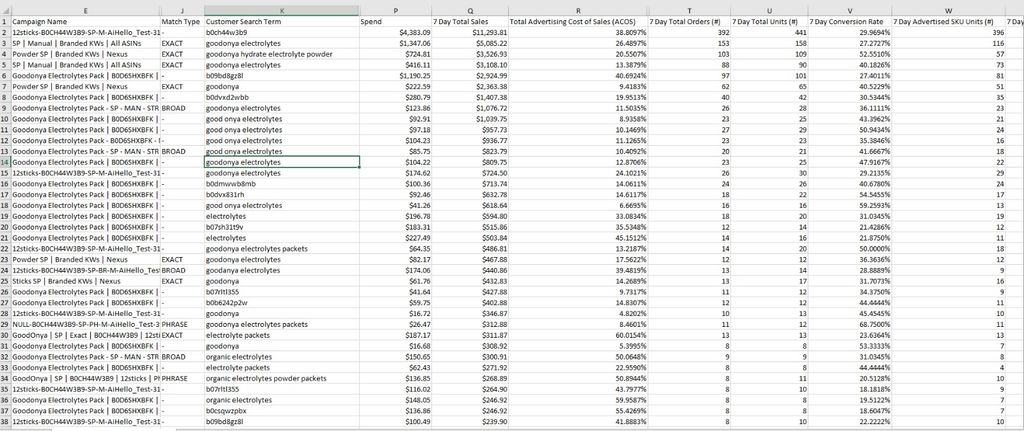
- Download the Search Term Report.
- Move the data into a spreadsheet.
- Sort and filter search terms based on clicks, spend, orders, sales, and ACoS.
- Find the terms that are worth harvesting.
- Copy those terms into the right manual campaigns.
- Add negative keywords where needed.
- Check bids and make further adjustments.
Doing this once is manageable. Doing it across dozens of campaigns and multiple ASINs every week is a different story.
The Timing Gap
There is another problem with manual harvesting: timing.
Imagine a search term starts generating consistent sales on Monday. But you don’t review the Search Term Report until Friday.
For those few days, the keyword may still be running inside a broad or automatic campaign with a bid that wasn’t specifically set for it. You may also be missing the chance to give that search term more budget or control.
This is what creates the timing gap between a search term showing strong performance and you actually acting on that data.
More Campaigns, More Work
The problem becomes even bigger when you’re managing multiple ASINs.
Every product has its own campaigns, search terms, budgets, and performance patterns. As the number of products increases, manual harvesting doesn’t just take more time, it gets complicated to maintain consistently.
This doesn’t mean manual harvesting won’t work. It simply means it becomes harder to do quickly and consistently without compromising profits
How Automation Improves Keyword Harvesting
Automation doesn’t change the basic idea behind keyword harvesting. It simply makes the process faster and easier to manage.
Instead of waiting for someone to download reports and check them manually, an automated system can keep an eye on campaign performance and look for search terms that meet specific conditions.
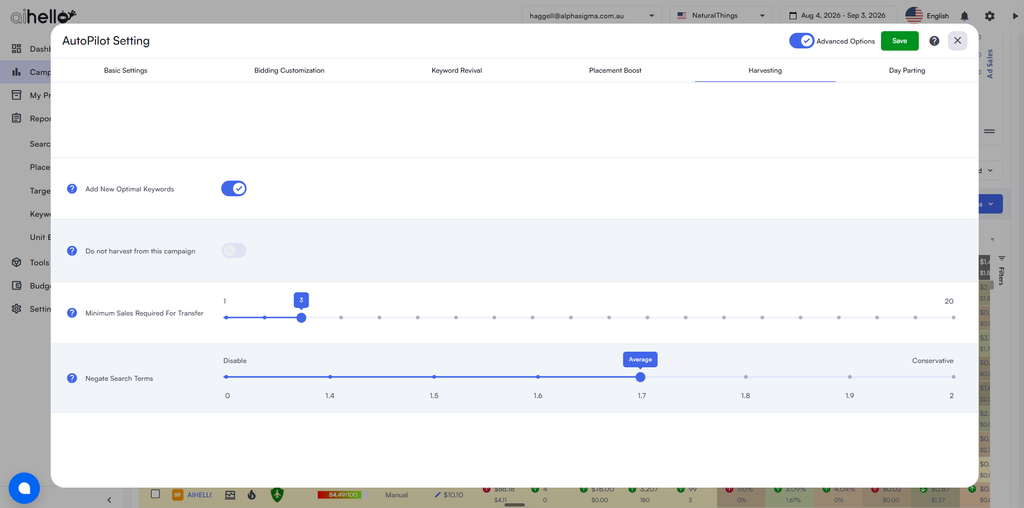
For example, you could set rules around things like orders, spend, ACoS, or conversion performance. When a search term meets those conditions, the system can identify it as a potential keyword to harvest.
This has few advantages
- Continuous monitoring: Campaign data can be checked regularly instead of waiting for a manual report review.
- Faster decisions: Good search terms can be identified sooner, reducing the timing gap.
- More consistency: The same rules can be applied across campaigns instead of relying on someone to remember to check each one.
- Less manual work: You spend less time downloading reports, sorting spreadsheets, and moving keywords between campaigns.
- Easier scaling: The process becomes much easier to manage when you have multiple campaigns and ASINs.
This is where tools such as AiHello can help. Instead of manually going through search term data and deciding what to do with every opportunity, AiHello can automate parts of the keyword harvesting process based on your campaign rules and performance data.
The goal isn’t to remove the seller from the process. It’s to remove the repetitive work around it.
You still decide the strategy. Automation helps make sure the process happens faster, more consistently, and without requiring you to manually check every campaign every day.
Common Keyword Harvesting Mistakes to Avoid
Keyword harvesting is simple in principle, but a few common mistakes can reduce its impact.
- Harvesting too early: Don’t move a keyword based on one click or one sale. Give it enough time to show a useful pattern.
- Using too little data: A few clicks aren’t always enough to judge a keyword. Look at spend, orders, sales, and ACoS before making a decision.
- Ignoring conversion metrics: Clicks can show interest, but sales and conversion rate tell you whether that interest is turning into customers.
- Forgetting negative keywords: Finding good search terms is only half the job. Negatives help prevent irrelevant searches and wasted spend.
- Harvesting everything: Not every search term deserves its own keyword. Focus on terms that are relevant and show real potential.
- Reviewing campaigns too infrequently: Search behavior and campaign performance can change quickly. If you only check your data occasionally, you may miss opportunities or allow poor-performing terms to keep spending.
The goal isn’t to harvest as many keywords as possible. It’s to find the right keywords, at the right time, and give them the right level of control.
Closing
Keyword harvesting works best when it becomes part of your regular PPC process.
Your campaigns are constantly generating new search data. Some search terms will become profitable keywords, some will need more testing, and others may need to be blocked with negative targeting.
Manual harvesting can handle this process, especially for smaller accounts. But as your campaigns grow, managing can take a lot of time. That’s where automation can help reduce the repetitive work and shorten the delay
The more consistently you review your search data and refine your targeting, the better your campaigns can respond to what customers are actually searching for.
And with the right automation in place, you can spend less time digging through reports and more time making the decisions that actually move your Amazon PPC forward.