If you prefer hands‑on control instead of full AI Autopilot, Action Pulse: Bid Optimization lets you codify your own rules for increasing or decreasing bids on keywords & product targets. Create conditions based on performance (ACoS, sales, clicks, CTR, CVR, CPC, impressions, spend, ROAS, etc.), then apply percentage or fixed changes with guardrails. It’s your SOP, executed automatically and logged transparently.
Define rules using ACoS, ROAS, sales, clicks, CVR, CTR, CPC, impressions, spend, and lookback windows (e.g., 7 / 14 / 30 days).
Increase or decrease bids by % or fixed amount. Add floors/ceilings, daily caps, and cooldowns to prevent volatility.
Every change is recorded with the trigger rule, before/after bid, timestamp, and actor (Action Pulse), so audits are painless.
Choose campaigns / ad groups, and whether the rules apply to keywords, product targets, or both. Filter by match type if needed.
Pick a lookback window (e.g., 30 days) and minimum data (e.g., ≥ 10 clicks, ≥ 2 sales) so rules act on meaningful samples.
Examples: ACoS > target + 10%, no sales & ≥ 12 clicks, CVR in top quartile, CTR < 0.3%, CPC > $1.20.
Increase/decrease bid by % or $. Add floors (min) and ceilings (max). Optionally round to increments (e.g., $0.02).
Run daily or on a custom cadence. Order rules by priority when multiple match, the first applicable rule executes.
See proposed changes before they go live. Activate to start automated execution and logging.
Craft rules with clear conditions and guardrails so changes remain controlled.
ACoS, ROAS, sales, clicks, CVR, CTR, CPC, impressions, spend, position (if available), and custom targets.
±% or ±$ bid change, optional rounding, and ability to skip if at floor/ceiling.
Min data thresholds, bid floors/ceilings, max daily change %, cooldown days, exclusions (brand terms, new keywords).
Run daily, specific weekdays, or on an hourly window depending on how quickly your market moves.
Use these as starting points and tune thresholds to your category and margins.
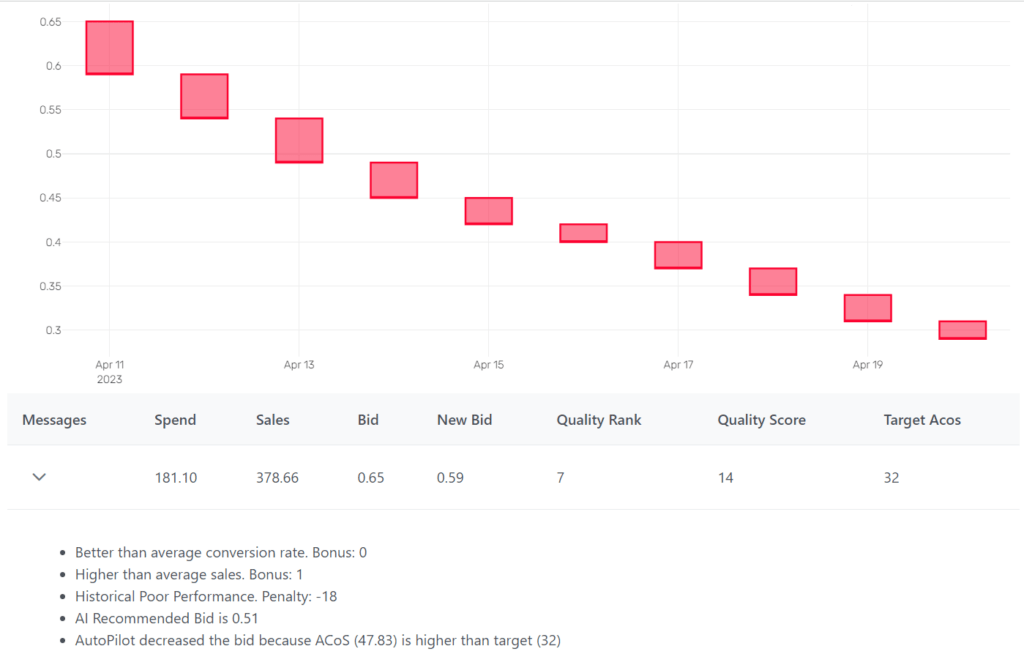
Every bid change is logged with the triggering rule, the before/after value, and a timestamp. Export logs to CSV for governance or share with your team for weekly reviews.
Filter by campaign, keyword/target, rule name, or date range.
View the bid changes and the corresponding spend/sales charts.
Create gentle ±5–10% rules first. Once stable, add stronger actions for clear outliers.
Always set bid minima and maxima to avoid runaway changes in volatile niches.
Use minimum clicks/sales to prevent changes on sparse data and seasonal noise.
Exact/Phrase/Broad behave differently. Tune thresholds per match type for precision.
Glance at logs weekly; prune rules that aren’t pulling weight or are fighting each other.
If you also use AI Autopilot, avoid overlap by isolating campaigns or sequencing updates to suit your workflow.
Recommended 16:9 aspect. Add captions to highlight a few high‑impact rule examples.