Unlock AiHello’s power on Shopify! Set up your private app, granting API permissions for automated fulfillment, inventory, and global product expansion.

Adding AiHello as a Private App on Shopify
download 2 1

Start by going to the API Generation page on Shopify:
2. In the private API section, click on the Apps link on step 4 and Sign in to your Shopify account

3. Click on Manage private apps on the bottom center of the page
4. Click on Create a new private app on the top right of the page
5. Add the name and email details of the App: AiHello is the name and [email protected] is the email
6. Click Save and Accept Shopify’s API Terms
7. Select the Admin API Permissions.
Below are all the permissions we need and the service we use them for:
In order to list AiHello as a secondary inventory location we need Read access to:
- Locations
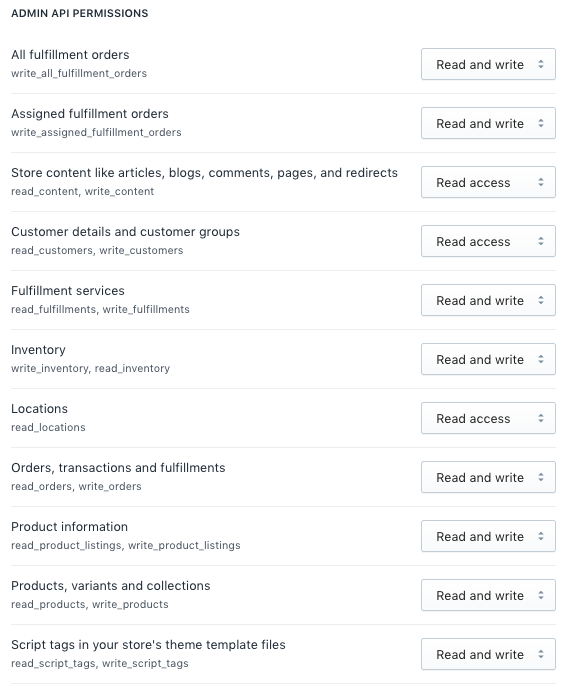
In order to copy listings and adjust the currency in new markets we need Read and Write access to:
- Product information
- Products, variants and collections
In order to allow international expansion and inventory management in the future we will need Read and write access to (OPTIONAL)
- Script tags in your store’s theme template files
8. Click Save on Shopify
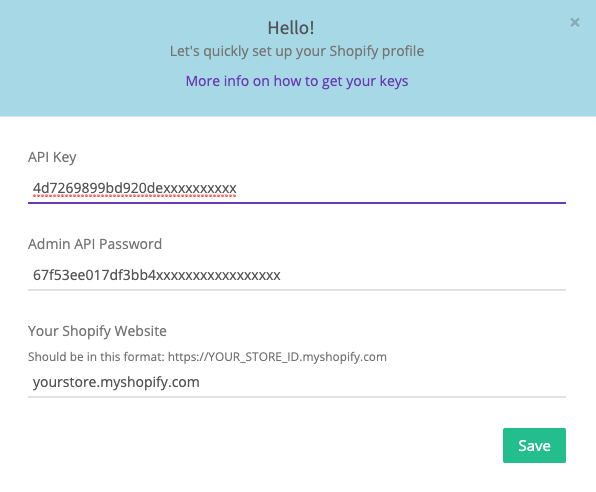
9. Copy the newly generated API Key and API Admin Password from Shopify and paste it on AiHello
10. Click Save on AiHello and go back to Shopify
Congratulations! Your AiHello and Shopify accounts are now connected
You are now ready to connect Fulfillment by AiHello