
Amazon PPC in 2025: Manual optimization fails as CPCs rise. Automation is key to stable ACOS and profitability. Learn why it’s essential for your ad strategy now!
Amazon PPC Automation: The Complete 2026 Guide for Sellers
Running a profitable Amazon PPC in 2026 is no longer about who spends more; it’s about who adapts faster. CPCs are rising, competition is tightening, and manual optimisation cycles simply can’t keep up with how quickly the marketplace shifts. Most sellers today aren’t losing money because their strategy is wrong, but because their execution is too slow for Amazon’s pace.
That’s where automation steps in. Before we dive into the full guide, here’s what PPC automation really means and what it doesn’t.
Amazon PPC automation handles the repetitive, time-sensitive aspects of ad management, including adjusting bids, pacing budgets, harvesting keywords, adding negatives, optimizing placements, and handling dayparting. What it cannot manage are your fundamentals: inventory, price changes, listing quality, and deeper profit leaks. Automation enhances a strong foundation; it doesn’t replace it.
Why Automate Now
Amazon ads have become more competitive than ever. CPCs keep rising year after year, and manual optimization is no longer enough to maintain profitability. Even skilled managers eventually hit a ceiling because Amazon PPC changes too fast, too often.
Automation solves this by doing what humans simply can’t:
- Adjusting bids multiple times per day
- Responding instantly to cost spikes
- Scaling budgets during peak demand
- Mining search terms the moment they prove profitable
- Respecting ACOS targets through continuous recalibration
You’re not replacing strategy; you’re replacing the manual workload between you and that strategy.
In 2026, automation isn’t optional; it’s the only scalable way to keep ACOS stable while CPCs climb.
Core Components of Amazon PPC Automation
A strong automation setup covers multiple layers of campaign management. Not all tools automate everything; some rely on rules, while others use machine learning. Here are the components that matter:
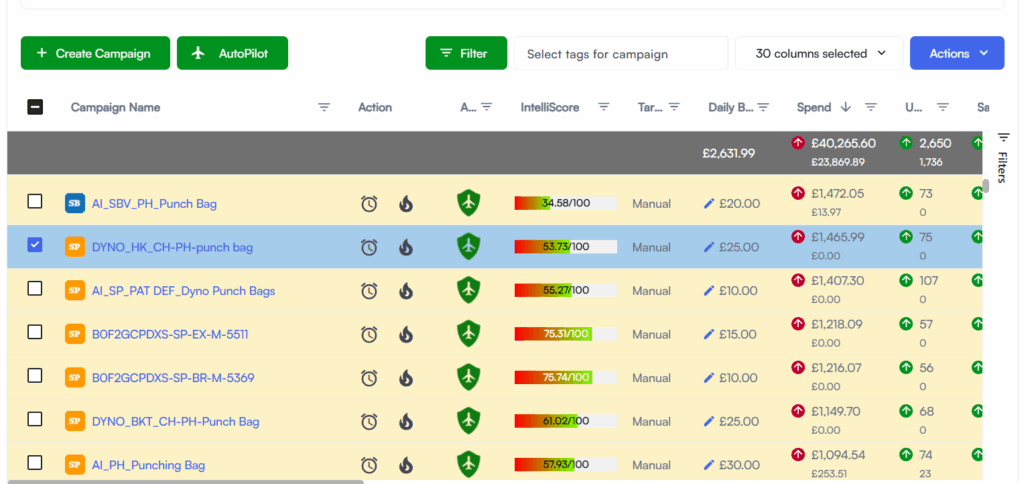
1. Bid Automation (Rules vs. Machine Learning)
Bid automation adjusts your keyword bids based on historical performance.
- Rules-based: IF ACOS > X, reduce bid by Y%
- ML-based: Learns patterns, predicts converting keywords, and adjusts dynamically
Rules are predictable. ML is adaptive. The best systems usually combine both.
2. Placement Optimization
Placements (Top of Search, Product Pages) can behave differently from your base bid. Automation can:
- Raise placement boosts when the data shows a strong conversion pattern
- Reduce boosts when costs spike
- Reallocate spend across placements automatically
3. Keyword Harvesting
Your automation should continuously mine search terms and convert high-performing ones into:
- Exact keywords (for precision)
- Phrase/broad variations (for controlled expansion)
This ensures no valuable keyword slips through.
4. Negative Keyword Automation
Equally important is cutting waste quickly. Automation eliminates:
- High-spend, zero-sales terms
- Irrelevant search terms
- Low-intent queries that inflate ACOS
5. Budget Pacing
Daily budgets often overspend or underspend when managed manually. Automation can:
- Distribute your daily spend across the day
- Increase budgets for top-performing campaigns
- Reduce spend when performance drops
- Ensure consistency across days and weeks
6. Dayparting
Not all hours convert the same. Automation identifies when buyers purchase the most and adjusts accordingly:
- Pauses ads during low-intent hours
- Boosts during high-conversion windows
- Smoothens spend before peak moments
This prevents random burn and focuses spend where ROI is highest.
Data You Need
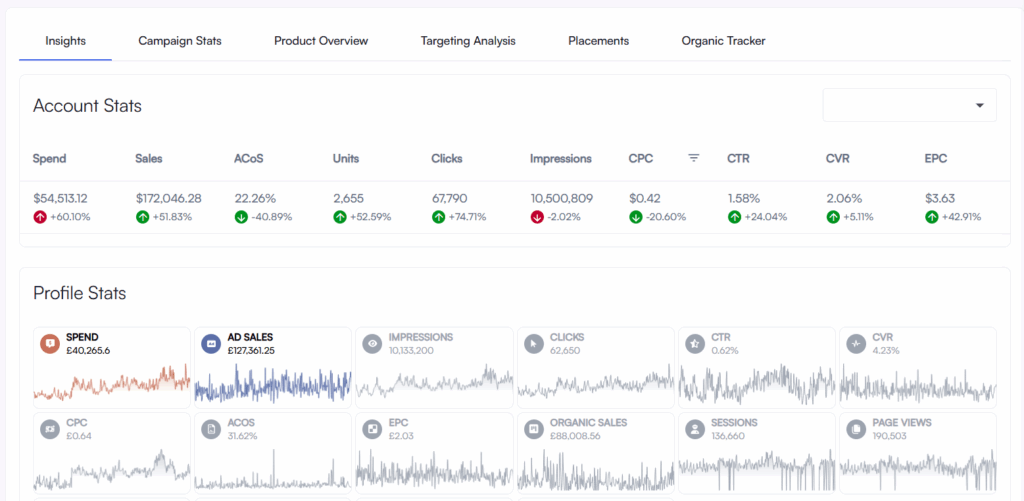
Automation works only when the underlying data is clean, consistent, and complete. Before switching on any PPC automation system, ensure the core metrics that drive bidding, keyword decisions, and budget pacing are accurate. These are the data points that matter the most:
Clicks
Clicks show demand and keyword intent. They tell the automation which terms attract shoppers and which ones fail to trigger interest. Low click-through rates usually indicate weak relevance or poor visibility.
Cost
This is your ad spend. Automation tracks cost to understand how aggressively a keyword is consuming budget. High cost with no sales is one of the strongest signals for bid reduction or negative keyword action.
Sales / Conversions
Sales provide the clearest indicator of keyword performance. They help automation identify profitable patterns, scale bids on winners, and push more spend into converting placements.
ACOS
Advertising Cost of Sale shows how efficiently your ad dollars turn into revenue. Automation reads ACOS at the keyword, target, and campaign level to decide whether to raise or lower bids.
TACOS
Total Advertising Cost of Sales connects ads with organic performance. It shows whether ads are growing overall revenue or just shifting sales. Automation uses TACOS trends to understand whether spend boosts true growth or just burns margin.
Inventory Levels
Even the best automation loses effectiveness when stock runs low. Inventory data prevents overbidding during low availability, protects your margins, and ensures automated scaling doesn’t push you into stockouts.
Price
Price changes directly influence conversion rate. Automation needs accurate pricing data to avoid overbidding when your price is temporarily higher, discounted, or fluctuating due to competitor shifts.
If these data points are clean, automation becomes predictable, stable, and intelligent. If they’re weak, delayed, or inaccurate, even the best automation will overbid, misread performance, or scale at the wrong time.
Workflow: What Automation Does vs. What You Still Oversee
PPC automation isn’t a “turn it on and disappear” system. It removes repetitive workload, not strategic responsibility. Think of it as a co-pilot: it manages the continuous adjustments while you control the direction.
On the automation side, the system handles all high-frequency tasks: bid corrections, keyword harvesting, negative keyword pruning, placement adjustments, budget pacing, and dayparting. These are activities that require constant monitoring and quick reactions, something humans simply can’t sustain manually.
The automation reads performance signals every hour, recalibrates bids when ACOS drifts, blocks wasteful terms the moment they appear, and reallocates spend to better-performing placements or time windows.
But there are areas where human judgment remains essential. You still define the broader strategy: setting ACOS and TACOS targets, ensuring inventory is healthy before scaling, maintaining competitive pricing, and keeping your listing optimized. You also review the weekly performance summaries to confirm the system’s behaviour aligns with your goals and seasonality.
In simple terms, automation keeps your campaigns efficient and stable in real time, while you stay responsible for the business decisions that automation can’t interpret on its own.
Risks & Safeguards
Automation is powerful, but only when it operates inside the right boundaries. If left unchecked, automated systems can overreact, cutting bids too deeply, increasing them too aggressively, or misreading short-term fluctuations as long-term trends. Seasonal spikes, sudden competition, or temporary conversion dips can all trigger unnecessary adjustments unless proper safeguards are in place.
That’s why every strong automation setup needs clearly defined guardrails. These prevent runaway behaviour and ensure the system stays aligned with your strategy rather than chasing noise.
Most sellers protect themselves using a few essential controls:
Minimum and maximum bid limits
These act as hard safety rails. They prevent your bids from dropping so low that you lose visibility or rising so high that costs explode.
Daily spend caps
Keeps your campaigns from burning through the budget during unexpected cost surges, especially during peak days or competitive spikes.
Observation periods
Automation waits for enough data before making major changes. This avoids reacting prematurely to a single bad day or a single high-cost click.
Defined ACOS thresholds per product
Each product behaves differently. Clear ACOS limits ensure the system knows when to stay aggressive and when to stay conservative.
With these in place, automation becomes steady, predictable, and far safer than manual trial-and-error. Instead of reacting emotionally to spikes, it operates with controlled precision, correcting issues without causing new ones.
Quick Start with AiHello AutoPilot
Getting started with AutoPilot is simple, but following the correct activation flow ensures the automation learns properly from day one. The goal is to give the system clean data, clear performance boundaries, and enough structure to make intelligent bid and keyword decisions right from the start.
7-Step Activation Checklist
- Connect Amazon Seller Central to sync all live campaigns
- Verify campaign types, portfolios, and ASIN mappings are imported correctly
- Set ACOS goals for each product or group
- Define minimum and maximum bid limits
- Set daily budgets for stable pacing
- Enable key modules: bid automation, keyword automation, placement optimization, dayparting
- Begin the four-week ramp-up and monitor weekly summaries
Once the initial setup is complete, AutoPilot begins analysing your campaigns and gradually increases the depth of automation based on performance patterns.
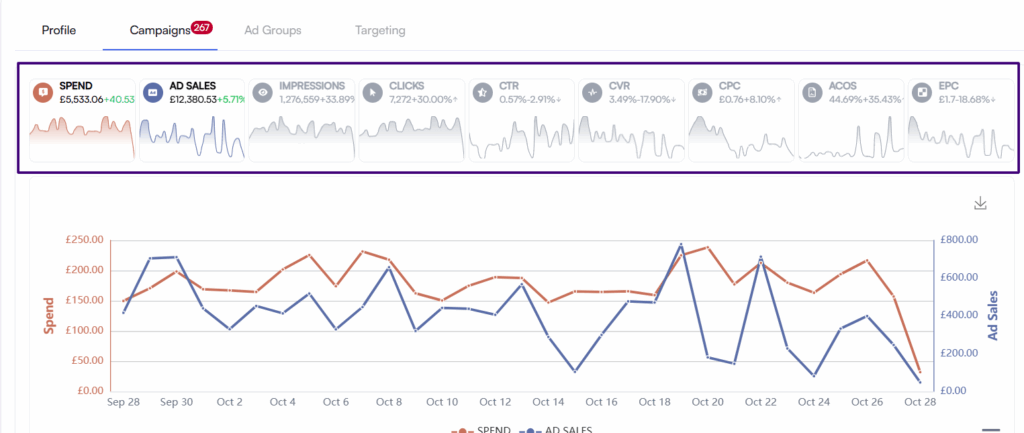
Week 1: The system observes your campaign behaviour and identifies patterns of high-converting keywords, weak placements, and periods of overspending. Changes are light during this phase.
Week 2: AutoPilot becomes more active. It begins adjusting bids more frequently, promoting converting search terms, and adding negatives to stop recurring waste.
Week 3: Advanced controls, such as dayparting and placement optimization, kick in. Spend is distributed more efficiently throughout the day, and high-performing placements receive calculated boosts.
Week 4: Performance stabilizes. Most unnecessary spend is cleaned up, keyword targeting becomes sharper, and ACOS trends begin to improve steadily.
By the end of the first month, you typically have campaigns that spend more efficiently, react faster to performance changes, and operate with far less manual intervention.
What Realistic ACOS Looks Like in 2026
One of the biggest misconceptions in Amazon PPC is assuming that “good ACOS” is a universal number. In reality, ACOS behaves differently depending on your category, margins, competitiveness, reviews, and most importantly, your stage of growth.
A realistic benchmark framework helps sellers evaluate performance accurately rather than reacting emotionally to numbers that are normal for their stage.
Sustainable & Established Brands: What Stable ACOS Actually Means
For mature brands with consistent reviews, strong organic ranking, repeat customers, and predictable conversion patterns, ACOS typically settles into a more efficient range. Most established products stabilize around 25–50% ACOS, while TACoS generally remains under 15%, reflecting the combined effect of paid and organic sales.
This stability occurs because campaigns have already completed their initial learning and refinement cycle. Conversion rates improve as your listing gains trust, your keyword base becomes more focused, and your competitors fluctuate less dramatically.
A key reason established brands enjoy stable ACOS is that campaign optimization compounds over time. As the account matures, irrelevant traffic gets filtered out, strong keywords rise, seasonality becomes predictable, and each dollar spent contributes more effectively to generating sales.
Performance at this stage is shaped by factors like pricing, competition level, the strength of your reviews, and seasonal demand. Campaign goals shift from exploration to efficiency: maintaining visibility while controlling spend and gradually scaling profitable segments.
In this phase, brands typically refine keywords rather than reinvent them, adjust bids based on actual margin conditions, and scale cautiously to ensure stable profits. Many sellers also build structured routines, adding negatives, controlling bid spikes, and nurturing top-performing campaigns to maintain long-term equilibrium.
Example of stabilized, efficient ACOS for an established ASIN after optimization.
Launching Phase: Why High ACOS Is Normal
A launch operates under completely different economics. When your product is new with no ranking history, no social proof, and no organic traction, the purpose of advertising is not efficiency; it is discovery and visibility.
Because of this, ACOS can easily climb to 80–100% or even higher, especially if you’re scaling aggressively to gather keyword data and trigger the ranking algorithm.
This is not poor performance; it is expected and necessary. Early campaigns prioritize impressions, click-through rates, and the initial conversions needed to build listing relevance. Conversion rates are naturally low at this stage because customers are still evaluating the product and comparing it with alternatives that have more reviews.
TACoS is less relevant during launch because organic sales are minimal; nearly everything is PPC-driven. The primary objective is momentum: finding converting keywords, building rank, and creating the data foundation for future optimization.
Automation adds extra stability here by eliminating waste early, suppressing low-performing search terms, and adjusting bids daily to prevent runaway spending. It ensures that even in the messy launch phase, your budget is channeled toward the most promising opportunities.
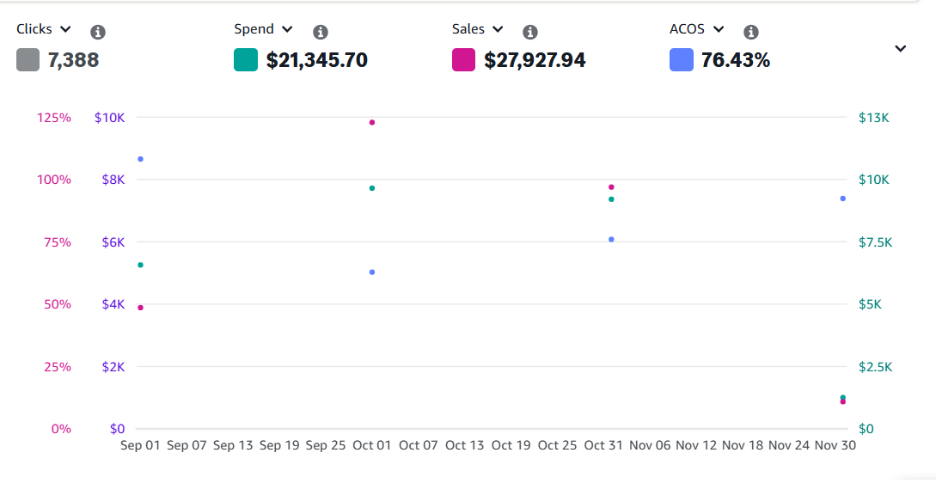
Example of high ACOS during a product launch, normal during early discovery and ranking.
Conclusion
If you’re ready to move away from manual PPC firefighting and let automation handle the repetitive work, now is the time to start. AiHello AutoPilot helps you stabilise ACOS, reduce wasted spend, and scale your ads with consistent, data-driven adjustments.
Turn on the Autopilot. With continuous bid adjustments, real-time keyword optimisations, budget pacing, and dayparting, AutoPilot gives your campaigns the consistency that manual management can’t match.
Experience what happens when your campaigns receive consistent, data-driven optimisation every single day, smoother spend, cleaner ACOS, and sharper keyword targeting, all without the constant manual firefighting.
FAQs
1. Does automation work for small budgets?
Yes. Automation is often more effective for smaller budgets because it eliminates waste quickly and reallocates spend toward keywords that actually convert. Even with ₹500–₹1,500/day budgets, you’ll see more predictable ACOS when bids and keywords are adjusted automatically instead of manually once a week.
2. How long does it take to see results?
Most sellers begin to see cleaner spending and reduced waste within the first 10–14 days. Clear ACOS improvements usually appear by Week 3 or Week 4, once the system finishes the learning phase and begins applying stronger optimisations, such as dayparting, placement boosts, and aggressive negative keyword pruning.
3. Can I override bids or change things manually?
Yes. You still maintain full control. You can override bids, adjust ACOS targets, change budgets, pause campaigns, or update keyword settings at any time. Automation manages the heavy lifting, but your strategy and decisions guide it.