

AiHello
AiHello powers dayparting with Amazon Marketing Stream; Amazon’s intraday feed that reports performance by hour and other signals.1
AiHello’s AutoPilot uses Amazon Marketing Stream to analyze your campaign’s daily and hourly performance over the past 60 days. By identifying key trends in when your ads perform best, AutoPilot can automatically adjust your ad scheduling to match those high-return periods. When you enable Automated Dayparting inside AiHello’s AutoPilot settings, it activates a system that works quietly in the background creating Scheduled Rules inside your Amazon ad account.2
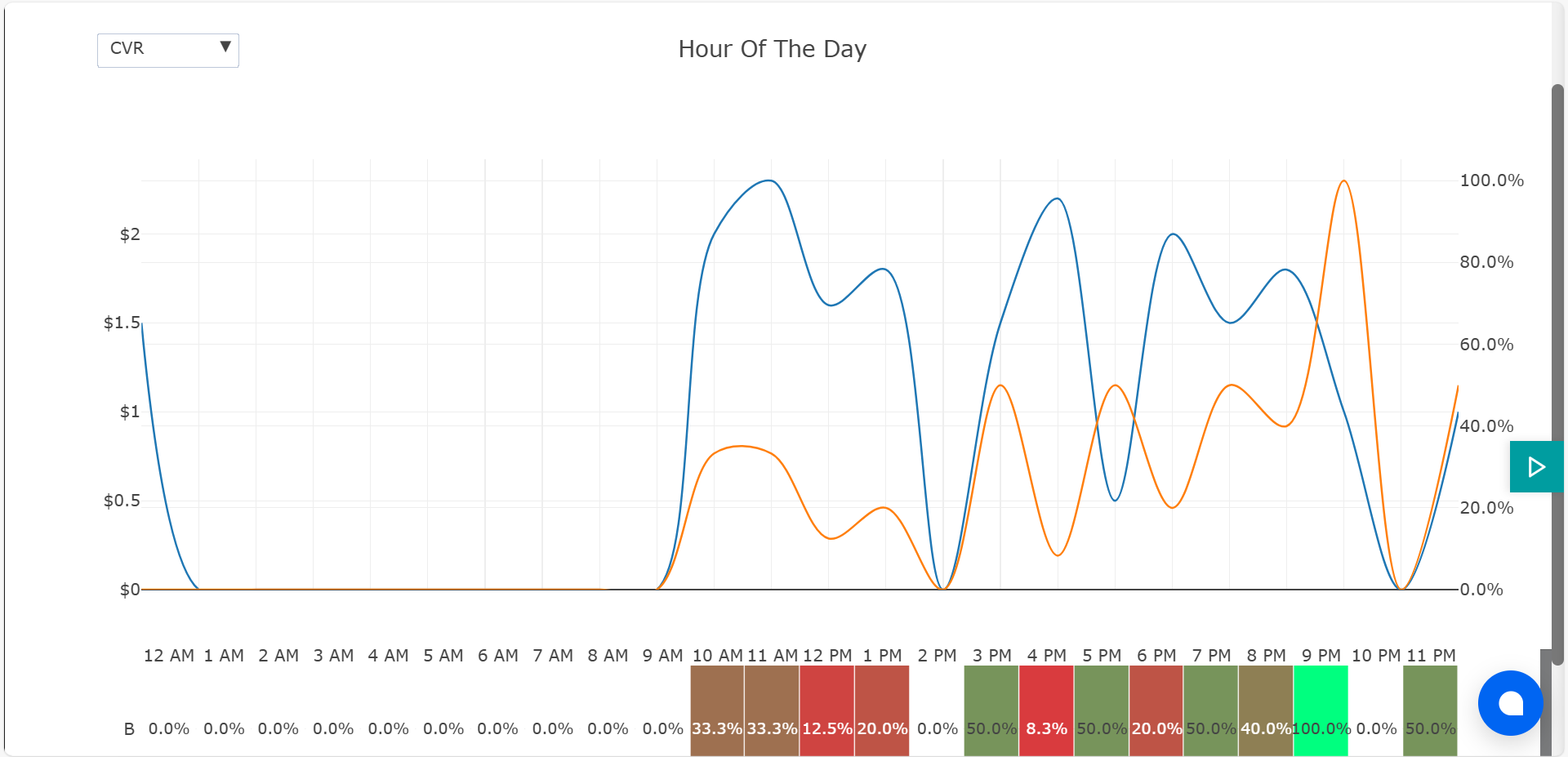
What is manual dayparting (and how it works in AiHello)1
Manual dayparting is the control to explicitly switch ads off during weak hours and switch them on during strong hours. In AiHello, you can apply this schedule to all campaigns for a product (recommended) or to specific campaigns if you need surgical control.
Think of it as the budget’s bodyguard: it keeps your spend away from hours that chronically underperform and pushes that money into windows where conversion rate (CVR) and order density are consistently better.
Why you must wait for data first (Marketing Stream 101)
- No backfill: Hourly data starts the day you connect your Amazon Ads account to AiHello. Yesterday’s hourly breakdown won’t appear retroactively.
- Patience pays: we recommend waiting at least 2-3 weeks so weekday/hour patterns stabilize. A few days of data is not enough to decide what to cut.
Only after those first couple of weeks should you enable manual dayparting. Until then, let campaigns gather reliable hourly signal.
Dayparting by product vs. by campaign
You can schedule at two levels:
- By Product (Recommended): Flips all campaigns linked to that product on/off together. This keeps messaging, bids, and placements aligned for the ASIN across hours.
- By Campaign: Useful for special tactics (e.g., a branded defense campaign that always stays on while competitor offense sleeps during poor hours). Use when the product’s campaigns have different strategic roles.
When to shut off hours (and when not to)
When not to cut:
- Lagged conversions: Some categories see orders later from earlier clicks. If an hour looks weak on click-to-order, check if assisted conversions land later.
- Ranking momentum: Excessive on/off flapping can destabilize your auction presence. Aim for clean blocks, not strobe lights.
- New launches: Early learning benefits from continuous data. Avoid aggressive cuts in week one.
Manual vs. automated dayparting (what’s the difference?)
AiHello offers both:
- Automated Dayparting (via AutoPilot): Adjusts bids up/down based on time-of-day patterns. It piggybacks on Amazon’s bid-boost rules and is gentler because ads never completely stop.
- Manual Dayparting: Hard switch off/on at scheduled hours. You gain maximum control and the ability to cut waste to zero in weak windows but you must use it judiciously to avoid delivery whiplash.
Blended approach: Start with automated to shape spend, then add manual off-blocks where the data shows chronic underperformance.
Dayparting with Automation Software3
To address the limitations of manual dayparting, automating Amazon ads dayparting with AI tools has become a necessity.
Tools like AiHello use data from Amazon Marketing Stream, which tracks ACoS, CPC, and CVR hourly. This allows the AI to identify trends and automatically adjust your bids throughout the day.
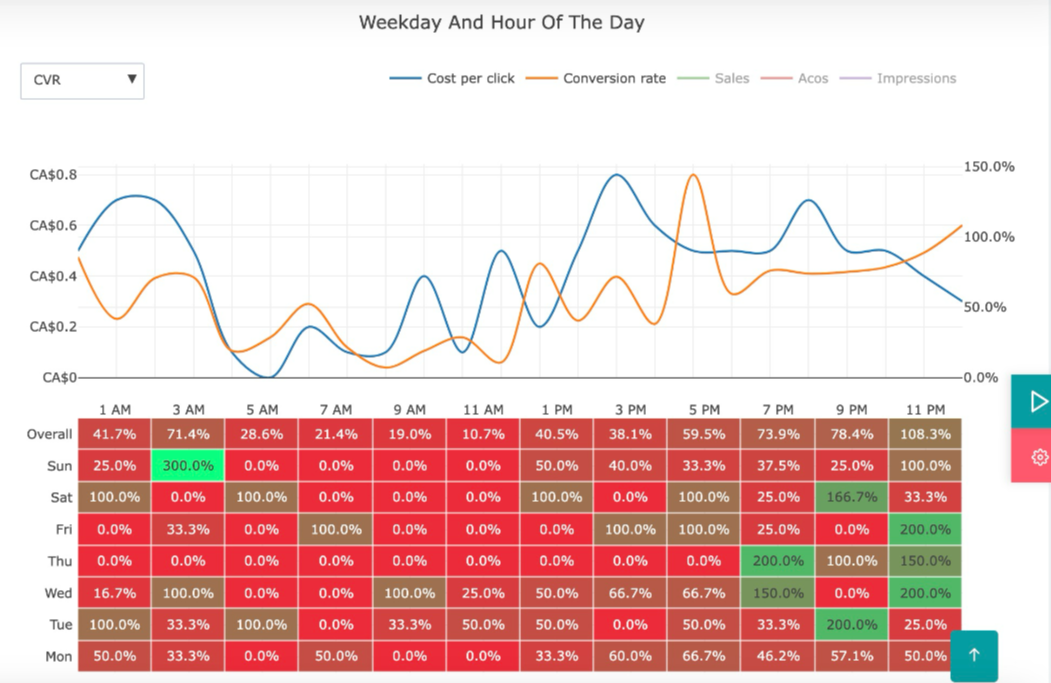
You don’t need to spend hours sifting through sales history or manually creating rules. Instead, the AI adjusts your bids intra-day based on the most profitable times for each product, ensuring that your budget is allocated efficiently.
By automating dayparting, you eliminate the manual workload, save time, and get better performance from your ads.
Collect enough signal1
Connect Amazon Ads, then let data accumulate. Resist the urge to cut after 72 hours; hourly patterns can be noisy in the short term.
Rank hours by efficiency, not just CVR
CVR is critical, but combine it with CPC and volume. A simple score is Orders per $100 spend by hour (or the inverse, Cost per Order). If an hour consistently produces half the orders at the same or higher CPC, it’s a candidate to turn off.