Every Amazon seller after starting their ad campaigns ask themselves the same question, is this ACOS good or am I spending too much? It’s the metric that gets into picture in every PPC discussions
Many articles will show you that a 20% or 30% ACOS is considered good. But the reality is different. The same ACOS can be profitable for one business and loss for the other. It depends on your profit margins, product category, business goals and your product lifecycle.
In this guide, you’ll learn what ACOS means, what a good ACOS looks like and how to calculate your break-even ACOS, why ACOS sometimes increases, and the practical ways to lower ACOS and improve PPC performance
What Is ACOS in Amazon PPC?
ACOS or Advertising Cost of Sales, is one of the key metrics in Amazon PPC. It tells you how much you’re spending on ads to earn every dollar of revenue from your ads.
Formula :
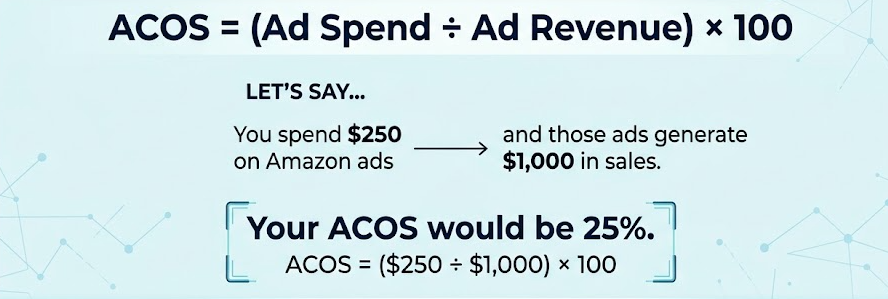
At first, it might seem like a lower ACOS is always better.But its not true
Imagine two sellers with the same 30% ACOS. One seller with premium skincare products with healthy profit margins, while the other sells electronics gadgets with tighter margins. Though both have the same ACOS, one campaign may be profitable while the other could be losing money
That’s why ACOS should never be viewed as the only important metric. It needs to be evaluated along with your profit margins, campaign goals, conversion rate and overall business strategy.
Think of ACOS as a quick check rather than a final result. It helps you understand how effectively your ads are performing, but it doesn’t tell the complete story of your business
Why ACOS Matters for Amazon Sellers
Every click on an Amazon ad will cost you money, and ACOS helps you understand whether those advertising money are generating profit or simply increasing your budget. It gives you a clear view of how efficiently your PPC campaigns are performing.
ACOS isn’t just a metric for measuring ad spend. It also helps sellers to make important PPC decisions. A higher ACOS may be good when launching a new product or improving keyword rankings, while mature products often aim for a lower ACOS to maximize profitability and the ideal ACOS changes depending on your objectives.
If your ACOS is always higher, it’s often a sign that your campaigns need attention, whether it’s improving keyword targeting, adjusting bids, or optimizing your product listing.
For a deeper look at practical optimization strategies, check out our guide on How to Reduce ACoS on Amazon: The Ultimate Guide
What Is Considered a Good ACOS in 2026 ?
There is no one universal definition for a good ACOS. Even if you look for it , you won’t find one
A healthy ACOS differs from one business to the other. The ideal number depends on lots of factors, including your profit margins, product category, competition, pricing strategy, and overall advertising goals. A 25% ACOS might give profit for one seller but is completely unstable for another.
This is why you should not compare your ACOS with industry benchmarks or other Amazon sellers .Those numbers don’t take account for your costs, business goals, or your product lifecycle. Instead of looking for a benchmark, focus on finding an ACOS that supports your own profit and growth.
In short, a good ACOS isn’t the lowest possible number, it’s one that supports your business goals
Average ACOS Benchmarks by Category
All Amazon businesses don’t share the same ACOS but the category benchmarks can provide a point of reference.
Most Amazon sellers usually see an ACOS between 20% and 35%, but the ideal range differs significantly depending on the product category, competition, and customer buying behavior.
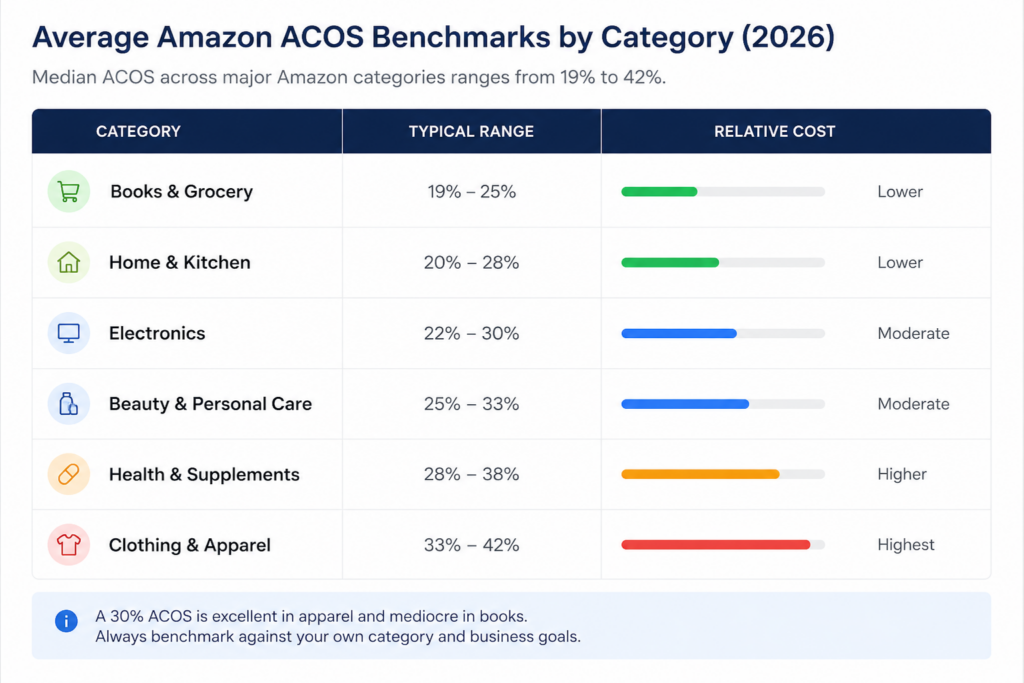
Industry benchmarks are a great way to understand how your campaigns compare with the market, but they should never define your PPC strategy.
The average ACOS varies significantly in product categories, so comparing your performance with sellers in a different category can lead to the wrong conclusions.
For example, supplement brands often operate with a higher ACOS because repeat purchases increase customer lifetime value, while electronics sellers usually aim for a lower ACOS due to tighter profit margins and higher competition.
Points to Check When comparing your ACOS
- Category matters. A 30% ACOS could perform great in one category and average in another.
- Use benchmarks for context, not as a target. Your margins and business goals matter more than industry benchmarks.
- Growth and profitability require different strategies. New product launches often justify a higher ACOS, while mature products usually focus on improving profitability.
- Measure success based on your business. The best ACOS is one that supports your growth, not simply the lowest number.
Break-Even ACOS: The Number Every Amazon Seller Should Know
Let’s assume two Amazon sellers, both running PPC campaigns with a 30% ACOS. One is making a good profit, while the other is losing money. The difference is clear.
It’s the Break-Even ACOS. It shows the maximum advertising cost your business can afford before your campaigns start to lose.
As long as your ACOS stays below this number, your ads will generate profit. Once it goes above your break-even point, it will start eating into your margins.
This is why seasoned Amazon sellers don’t rely on industry benchmarks alone. Before adjusting bids or pausing campaigns, they first understand how much ACOS can impact their business
Understanding Break-Even ACOS
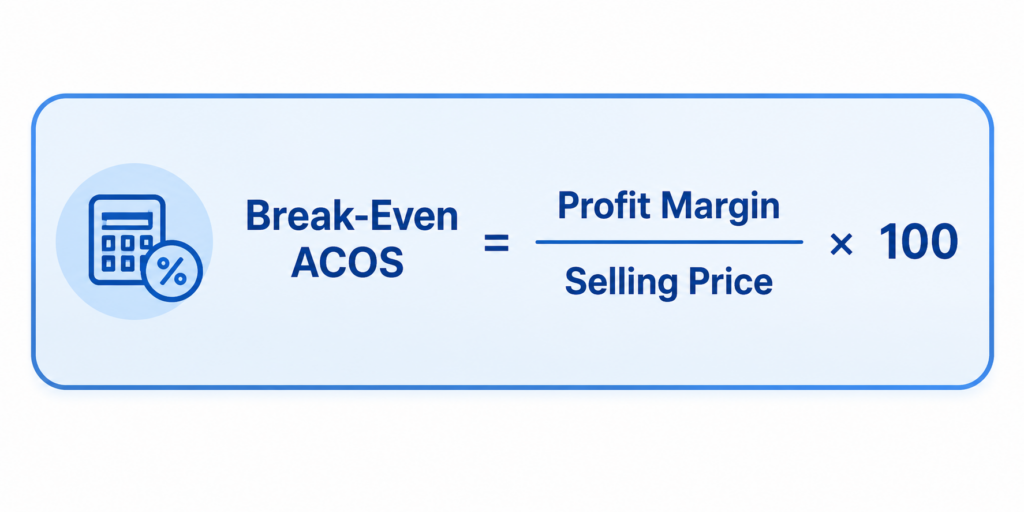
Break-Even ACOS Formula
Break even ACOS = Profit margin before ad spend
For Example, your product sells for $60 on Amazon. After deducting manufacturing costs, FBA fees, referral fees, shipping, packaging, and other selling expenses, you’re left with $18 in profit before advertising.
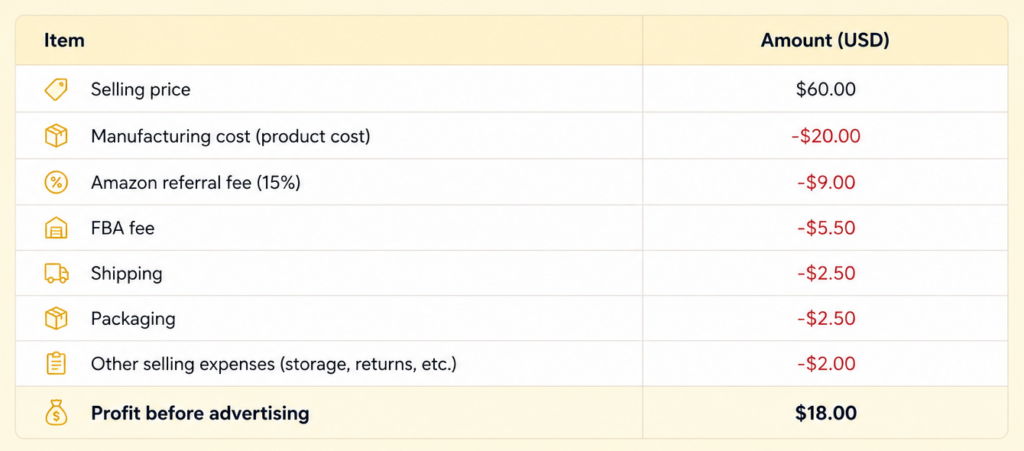
($18 ÷ $60) × 100 = 30%
That means your Break-Even ACOS is 30%.
- Below 30% ACOS – Your campaigns are profitable.
- 30% ACOS – You’re breaking even.
- Above 30% ACOS – Your advertising costs are reducing your profit margin.
Common Mistakes to Avoid
Many sellers wrongly calculate their Break-Even ACOS because they skip to include all of their costs. Before calculating your profit margin, make sure you’ve calculated
- Amazon referral and FBA fees.
- Shipping, storage, and packaging costs.
- Coupons, discounts, and promotional offers.
- Product returns and other operational expenses.
A well calculated Break-Even ACOS gives you a stronger benchmark than any industry average.
Once you know your number, you can decide whether to run campaigns for profit or intentionally accept a higher ACOS to support growth.
ACOS vs TACOS: What’s the Difference?
A lot of Amazon Sellers look at ACOS but they won’t have a closer look at TACOS. The problem is ACOS doesn’t give you the complete view.
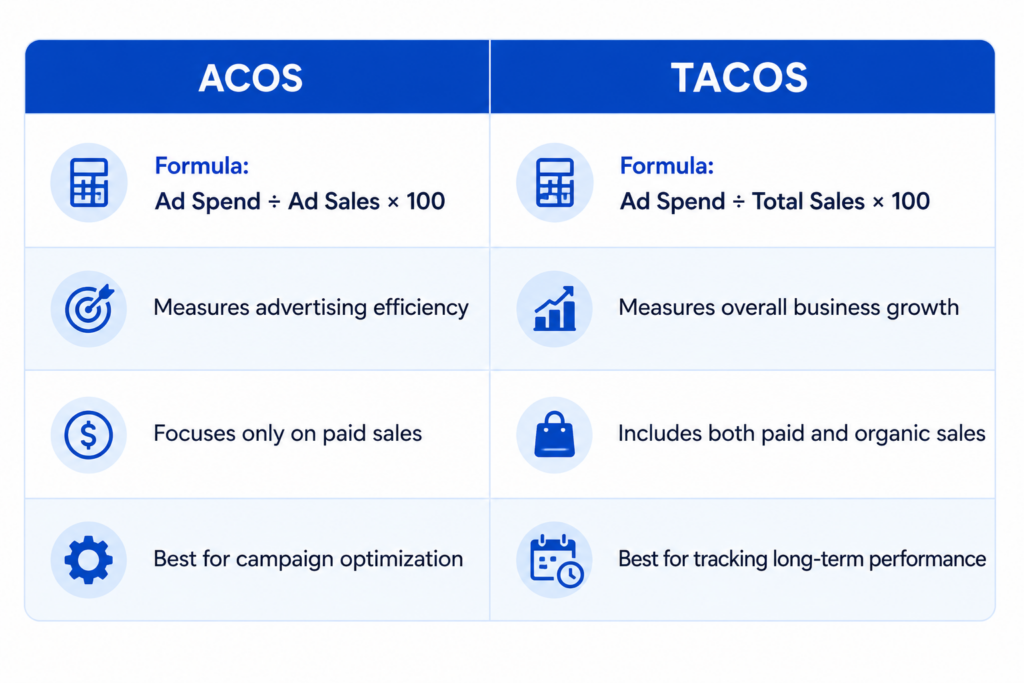
ACOS shows how your campaigns perform but TACOS shows how your ads impact your overall business growth including both paid and organic sales. You have to look at both the metrics to get better understanding of your PPC campaigns
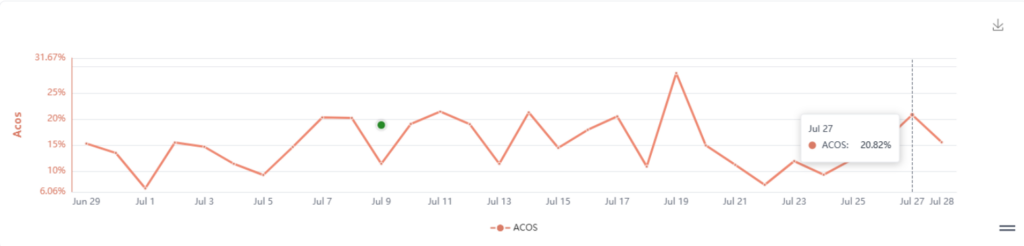
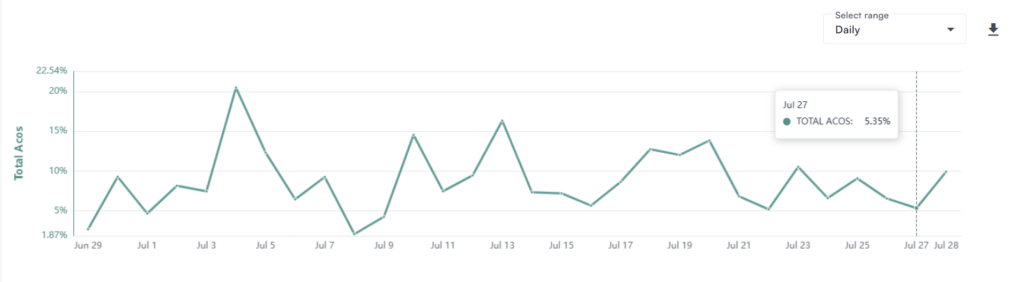
Here’s a simple comparison:
Why TACOS Is Important
TACOS helps you to see the larger picture. If your PPC campaigns bring more sales and conversions, your products will start getting higher ranks in search results.Better Rankings will help you to get more organic sales. which means you don’t have to rely on paid ads every time.
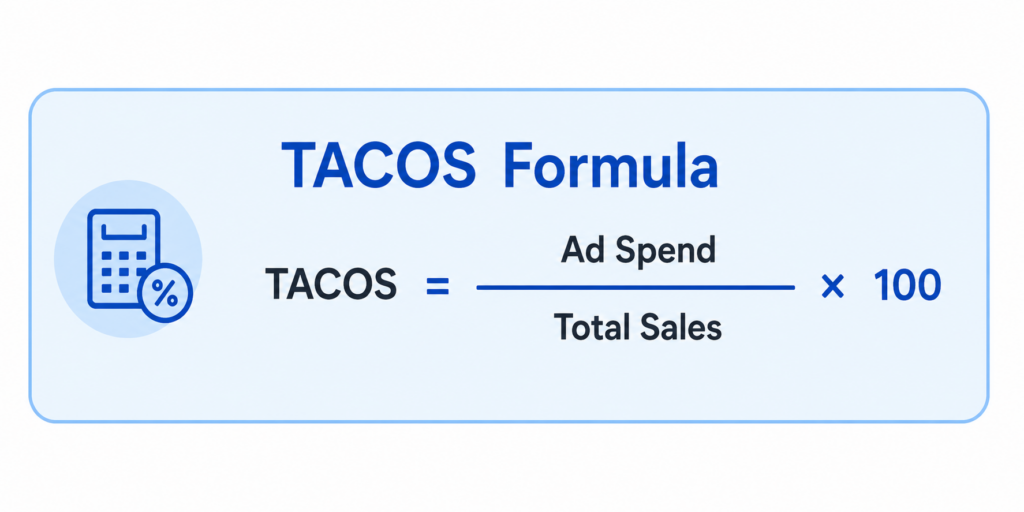
For Example, your ACOS is at 30% but your TACOS dropped to 18% to 10%, which is a good sign. That means your ads are doing more than just sales. They are helping to get more visibility and traffic.
For a deeper understanding of TACoS, check out our Amazon TACoS: What it Means and Why it Matters blog, where we explain how it works and how to use it alongside ACOS to measure long-term PPC performance.
Instead of looking at ACOS and TACOS separately, use them together:
- Track ACOS to improve the performance of your PPC campaigns.
- Track TACOS to measure long-term business growth.
- Watch how both metrics change over time, not just week to week.
Why Your ACOS Raising Too High?
A higher ACOS doesn’t mean your PPC campaigns are failing. It simply says that it needs attention. You just have to find out what’s causing the issue before making decisions.
ACOS increases for several reasons. Sometimes you’re paying too much for clicks. Other times, Shoppers are clicking your ads but not buying because your product listing is weak and not convincing enough. That’s why it’s important to look beyond the ACOS number and identify what’s happening inside your campaigns.
Some of the most common reasons include:
- Poor keyword targeting : Broad or irrelevant keywords can attract clicks from shoppers who aren’t ready to buy.
- Weak product listings : Low-quality images, No clarity in titles, poor A+ Content, or uncompetitive pricing can hurt conversions.
- High CPC (Cost Per Click) : Competitive keywords often cost more, increasing your advertising spend.
- Low conversion rate : If shoppers click your ads but don’t place an order, your ACOS will naturally increase.
- Wrong bidding strategy : Bidding too aggressively can drive up costs without delivering enough additional sales.
- Campaign overlap : Multiple campaigns targeting the same search terms can compete with each other and increase CPC.
All these things are fixable. Regular campaign reviews, search term analysis, and listing improvements can help bring your ACOS under control.
When Is a High ACOS Actually the Right Call?
A high ACOS can be worrying, but it isn’t always a sign that your campaigns are underperforming. Sometimes, spending more on advertising is part of a growth strategy.
For example, if you’re launching a new product, you’re competing with seasoned sellers who already have reviews, sales history, and strong keyword rankings. Running PPC campaigns at a higher ACOS during this stage can help generate visibility, collect early sales, and build momentum.
The same applies to situations like:
- Product launches : Increase visibility and generate initial sales.
- Keyword ranking campaigns : Improve rankings for important search terms.
- Seasonal events : Stay competitive during Prime Day, Black Friday, and holiday shopping periods.
- Brand defense campaigns : Protect branded keywords from competitors.
- Building reviews and visibility : Invest in long-term growth during the early stages of a product’s lifecycle.
In these situations, the goal isn’t simply to keep ACOS low. It’s to build a stronger product that generates more organic traffic and sales over time.
Instead of looking at ACOS alone, experienced Amazon sellers also monitor TACOS, organic sales, keyword rankings, and overall profitability. These metrics help us to decide whether a higher ACOS is a smart investment or a sign that the campaign needs optimization.
A higher ACOS isn’t always a problem. The real question is whether it’s helping your business grow or simply increasing your advertising costs.
7 Proven Ways to Lower ACOS
Lowering your ACOS isn’t something that happens with one big change overnight. It’s usually a lot of small improvements across your PPC strategy that you add over time. And the goal isn’t just spending less on ads either, it’s making every dollar you do spend worth it.
Here are seven ways Amazon sellers actually lower their ACOS without losing sales along the way.
1. Fix Your Listing Before You Touch Your Bids
A lot of sellers see ACOS creeping up and go straight to lowering bids. But before you touch anything in your campaigns, look at your product listing first. If people are clicking your ad but not buying, the issue probably isn’t your PPC setup at all. It’s your listing.
Look at your images, your title, your bullet points, your A+ Content, your reviews, your pricing. All of it. A better listing means more of those clicks turn into sales, and that alone can move your ACOS more than any bid change would. Honestly, this step gets skipped way too often.
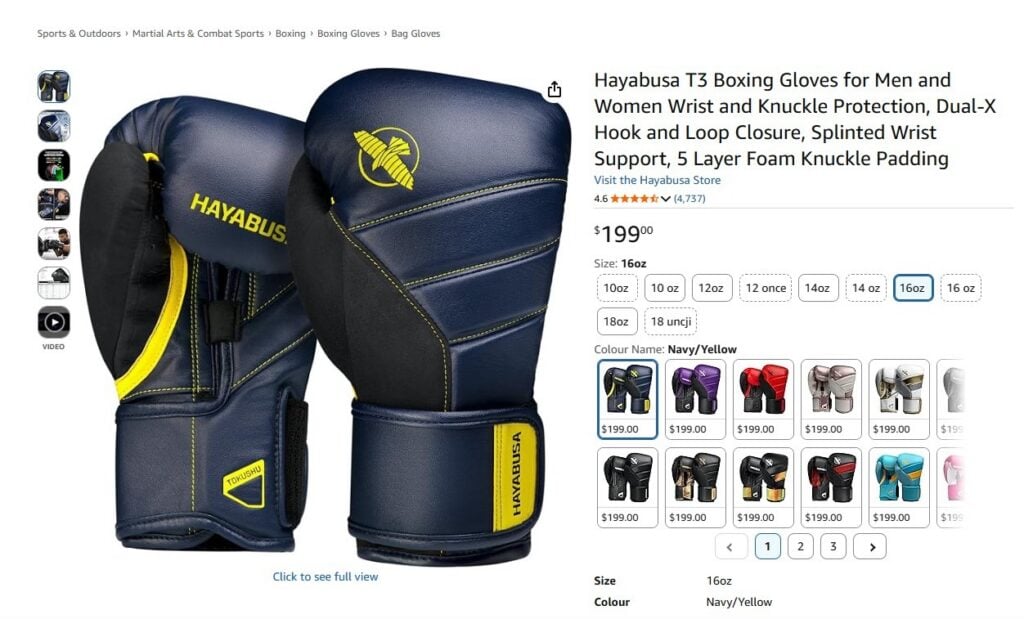
Want help with this part? Check out our Amazon Listing Optimization Guide for tips on building pages that actually convert Amazon Product Listing Optimization – The Practical Seller Guide
2. Go Through Your Search Term Reports and Cut the wasted spend
Not every search term deserves your ad budget. Some keywords bring up clicks but never turn into a single sale, and they quietly drain your spend without you even noticing.
Go through your search term reports regularly. Find the keywords that just aren’t converting or clearly don’t belong, and add them as negatives. It’s a simple habit, but it keeps your budget going toward searches that actually have a shot at converting.
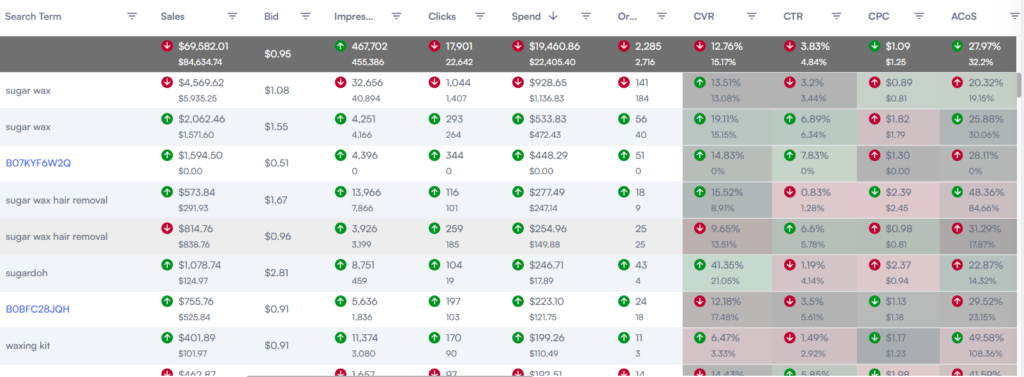
3. Split Your Campaigns by Match Type
Once your campaigns grow past a certain point, keeping broad, phrase, and exact match keywords all jumbled together in one campaign gets messy fast. A cleaner way to do it is pulling your best converting search terms into their own exact match campaigns, where you can control bids more precisely.
After you move them, don’t forget to add those same terms as negatives back in the original campaigns. Otherwise you’ll just have your own campaigns bidding against each other, which helps nobody.
4. Lean Into Long-Tail Keywords
Broad keywords look tempting because of the volume, but they usually come with brutal competition and higher CPCs to match. Long-tail keywords bring in less traffic but the people searching them usually know exactly what they want.
Take “boxing gloves” versus “boxing gloves for beginners” or “boxing gloves for sparring.” The long-tail version pulls in shoppers who are much closer to actually buying. None of these wins feel huge on their own, but they increase over time.
To Know more about Long Tail keywords strategies check out our blog Amazon long-tail keyword strategy to fuel your PPC campaign
5. Adjust Bids by Placement, Not Just Overall
Your ads don’t perform the same everywhere. Some products do great at the top of search. Others actually convert better on product pages or lower down in search results.
Check your placement reports and adjust your bid based on where you’re actually seeing results. Don’t just raise bids across the board. Put more money where it’s already working.
6. Try Dayparting
People don’t shop the same way all the time. If your campaigns consistently underperform during certain hours, keeping your bids at full price the whole day can quietly hurt your ACOS.
Dayparting lets you pull back bids during the slow hours and push more budget toward the times shoppers are actually buying. It’s a small tweak, but it can cut wasted spend without touching the hours that actually work for you.
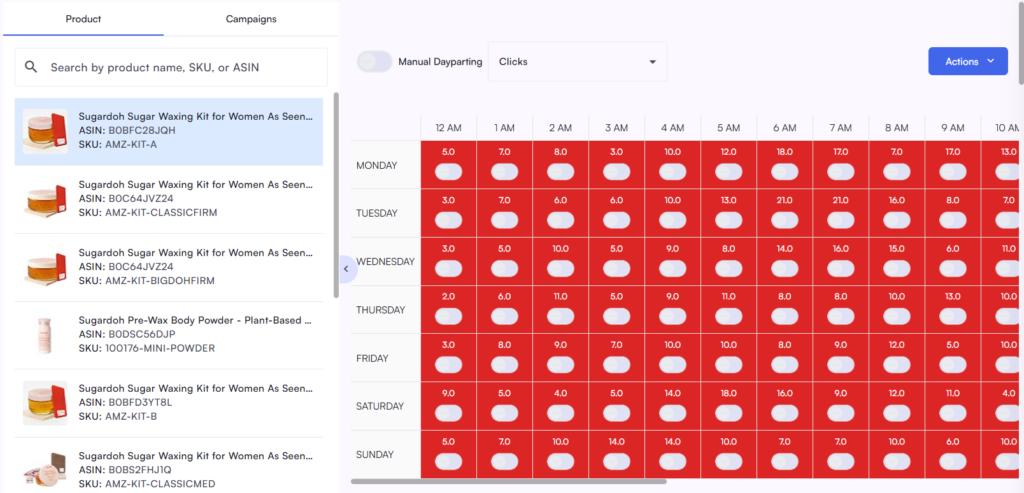
Learn the concept of Day Parting in detail with our guide The Ultimate Guide to Amazon PPC Dayparting: How It Works and When to Use It
7. Spread Your Budget Across the Whole Funnel
Not every campaign is trying to do the same job. Sponsored Products usually drive direct sales, while Sponsored Brands, Sponsored Display are more about getting your brand in front of new people.
If your upper-funnel campaigns show a higher ACOS, don’t panic and judge them the same way you’d judge a bottom-funnel campaign.
They’re doing a different job, building awareness, reaching new-to-brand customers, so measure them that way. Give each campaign the budget and the success metric that actually fits its role, and your account ends up healthier overall.
How PPC Automation Helps to Maintain a Healthy ACOS
Running two or three PPC campaigns by hand? Fine.Totally manageable. But once your business grows more products, more keywords, more campaigns, it will be difficult to check everything manually every single day. Most sellers hit this wall in the process, usually right around the time they add their 20th or 30th SKU.
Automation doesn’t take your strategy away from you. It just does the repetitive work you need to put in like looking after performance, adjusting bids, catching problems before they eat your budget so you’re still the one calling the shots, just with fewer problems.
AiHello was built for sellers in exactly this spot. No more spending an hour every morning combing through campaigns line by line.
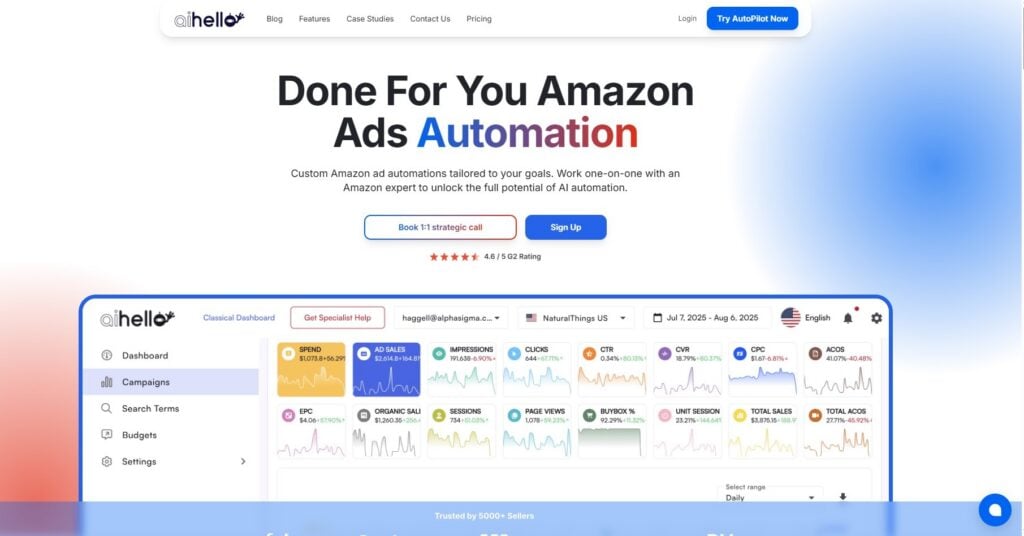
You automate the boring, repetitive stuff and keep your hands on the metrics that actually matter.
What you get with AiHello:
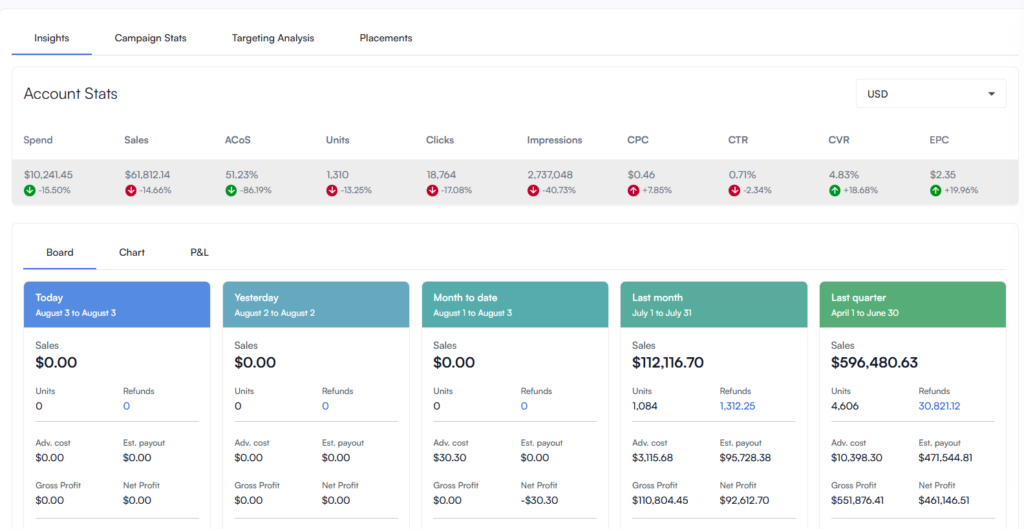
- Bids that adjust themselves based on how campaigns are actually performing, in real time no waiting around for you to notice a dip
- New keyword opportunities surfaced automatically. Less wasted spend, more of your budget going where it should
- Budgets and campaigns running without you having to babysit every single metric
Honestly, the real shift isn’t even the automation itself, it’s what it frees up. Less time buried in ad dashboards, more time actually building the brand, improving the product, making the calls that move the business forward. And your ACOS? Stay healthy without wasting your whole week.
Wrap up
There is no one universal ACOS number that works for every Amazon seller. The right ACOS depends on lot of factors like your profit margins, business goals, product category, and your product lifecycle
So Instead of chasing industry benchmarks, focus on understanding your own numbers. Calculate your break-even ACOS, monitor key metrics like TACOS, CTR, CPC, and conversion rate, and make better decisions based on data rather than assumptions. That’s how you build campaigns that are both profitable and sustainable.
Amazon PPC isn’t about achieving the lowest possible ACOS. It’s about finding the right balance between advertising costs, sales, and long-term business growth. Keep testing, keep optimizing, and let your business goals not the benchmarks guide your PPC strategy.